
Understanding the difference between collated and uncollated may sound simple, but misunderstanding it can lead to costly mistakes, wasted time, and serious workflow disruptions. Whether you are working in an office, a print shop, an academic environment, or managing large document production, the choice between collated and uncollated output matters more than most people realize. This article provides a clear, in-depth, and practical explanation of collate vs uncollated, helping you make the right decision every time.
What Does “Collated” Mean?
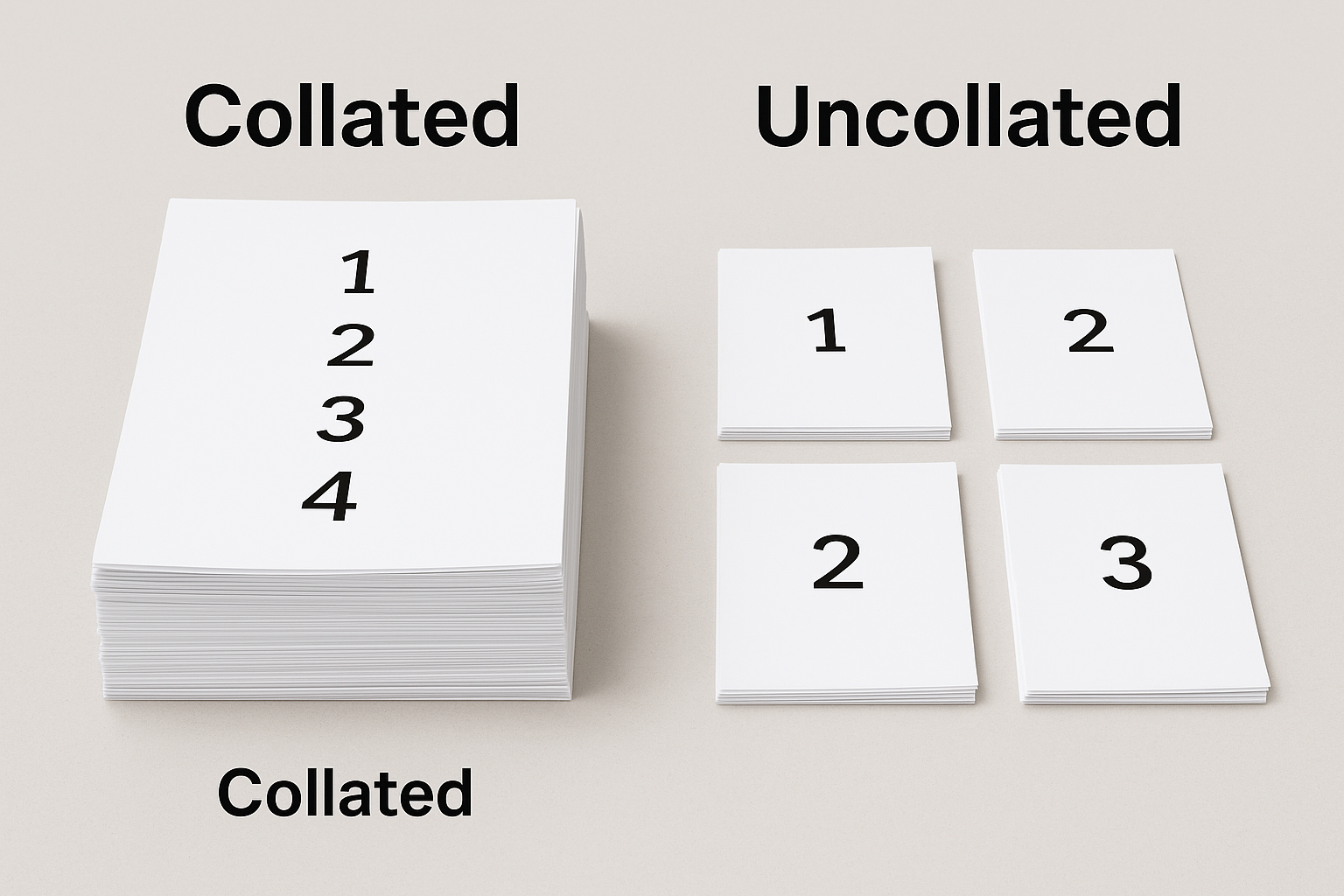
When documents are collated, pages are arranged into complete, sequential sets. Each set contains all pages in the correct order before the next set begins.
Example of Collated Printing
If you print a 3-page document (Page 1, Page 2, Page 3) and request 3 copies, collated output will look like this:
- Copy 1: Page 1, Page 2, Page 3
- Copy 2: Page 1, Page 2, Page 3
- Copy 3: Page 1, Page 2, Page 3
Each copy is ready to distribute immediately without additional handling.
Why Collated Printing Is Important
Collation is essential when documents need to be:
- Handed out individually
- Stapled or bound
- Mailed as complete packets
- Reviewed or signed page-by-page
Failing to collate in these situations can cause confusion, delays, and even professional embarrassment.
What Does “Uncollated” Mean?
Uncollated documents are printed in grouped stacks of the same page before moving to the next page.
Example of Uncollated Printing
Using the same 3-page document and 3 copies, uncollated output would be:
- Page 1, Page 1, Page 1
- Page 2, Page 2, Page 2
- Page 3, Page 3, Page 3
The pages are grouped by number rather than by complete document sets.
When Uncollated Printing Makes Sense
Uncollated printing is useful when:
- Pages will be assembled manually
- Documents are inserted into different packets
- Printing is done for internal processing
- Speed is more important than organization
In some high-volume printing environments, uncollated output can be faster and easier to manage during post-processing.
Collated vs Uncollated: Key Differences
1. Order of Pages
- Collated: Complete document sets in order
- Uncollated: Same pages grouped together
2. Time Efficiency
- Collated: Saves time after printing
- Uncollated: May save printer processing time but adds manual work
3. Error Risk
- Collated: Lower risk of missing or misordered pages
- Uncollated: Higher risk if manual sorting is required
4. Best Use Case
- Collated: Final distribution
- Uncollated: Internal handling or bulk assembly
Why Choosing the Wrong Option Can Be Dangerous
The difference between collated and uncollated may seem minor, but choosing incorrectly can have serious consequences.
Professional Risks
- Sending incomplete reports to clients
- Submitting misordered documents
- Creating confusion during presentations
Financial Risks
- Reprinting costs
- Labor costs for manual sorting
- Delayed deadlines
Legal and Academic Risks
- Incorrect page order in legal filings
- Missing pages in contracts
- Misassembled exam papers
In environments where accuracy matters, collation is not optional—it is critical.
Collated Printing in Office Environments
In modern offices, collated printing is often the default because it supports productivity and professionalism. Meeting agendas, proposals, training manuals, and performance reports all benefit from being collated.
Employees can immediately:
- Staple documents
- Place them in folders
- Distribute them to colleagues
Without collation, valuable work hours are lost sorting papers manually.
Uncollated Printing in Industrial and Commercial Settings
Uncollated printing still plays an important role, particularly in large-scale operations.
Examples include:
- Printing thousands of flyers
- Mass mail preparation
- Bookbinding processes
- Automated insertion systems
In these cases, machines or specialized workflows handle page assembly later, making uncollated output more efficient.
Digital Printing and Collation Settings
Most modern printers and software allow users to select collated or uncollated with a simple checkbox. However, mistakes happen when users assume the default setting is correct.
Common causes of errors:
- Rushing through print dialogs
- Using shared printers with preset options
- Printing from different applications
Always double-check the collation setting before printing multiple copies.
Collated vs Uncollated for Students and Educators
In academic environments, collated documents are almost always preferred.
For Students
- Assignments remain in correct order
- Pages are easier to review
- Reduced risk of lost marks due to missing pages
For Teachers
- Faster grading
- Clearer evaluation
- Professional presentation
Uncollated submissions can frustrate instructors and reflect poorly on the student’s attention to detail.
Psychological Impact of Organized Documents
Beyond logistics, collation affects perception. A neatly collated document communicates:
- Professionalism
- Preparedness
- Respect for the reader
Uncollated or disorganized papers can create a negative impression, even if the content itself is excellent.
Common Myths About Collate vs Uncollated
Myth 1: Collation Always Takes Longer
In reality, modern printers handle collation efficiently, and the time saved afterward often outweighs any minor delay.
Myth 2: Uncollated Is Only for Beginners
Many professionals intentionally choose uncollated printing for specific workflows.
Myth 3: It Doesn’t Matter for Small Jobs
Even small print jobs can suffer from page order mistakes if collation is ignored.
How to Decide Between Collated and Uncollated
Ask yourself these questions:
- Will each copy be used as a complete document?
- Will pages be distributed individually or in sets?
- Is manual sorting practical or risky?
- Does accuracy matter more than speed?
If the answer favors organization and clarity, collated is the safer choice.
Final Thoughts
The difference between collated vs uncollated is more than a printing preference—it is a decision that affects efficiency, accuracy, and professional credibility. Collated documents provide structure, reliability, and readiness, while uncollated documents offer flexibility for specialized workflows.
Understanding when and why to use each option empowers you to avoid costly mistakes and maintain control over your document production process. In a world where details matter, choosing the correct collation setting is not just helpful—it is essential.
